This is my first UNCATEGORIZED blog post! Not one of my weekly update posts!
A couple of days ago, I stumbled upon this post by Cassidy Williams (cassidoo.co) explaining how you can style an RSS/Atom feed using XSL (eXtensible Stylesheet Language) and was immediately intrigued. Since I’m procrastinating on Art Fight (whoops) I decided to take some time to style my web feed and wanted to make a blog post about the process and results.
I started by copying the XSL that Cassidy uses for her blog into my theme directory. Since she uses Astro and I use Pelican, I wasn’t able to copy her instructions for applying the XSL to my feed; fortunately, I found another Pelican user, Daniel, who’d already gone through this process, created a Pelican plugin, and made a blog post about how to use it. I installed the plugin and quickly got things working.
Except! The XSL I’d copied from Cassidy didn’t work right out of the box. The HTML elements and CSS from the XSL were displaying correctly, but the template wasn’t displaying any of my feed items. I compared her template with the template in Daniel’s blog post and realized it was because the syntax for selecting the feed attributes is different between Atom and RSS, which makes sense. I was able to copy Daniel’s example to get my feed items to display. Now it was time to add STYLING!
While brainstorming ideas for my site’s design (which is pretty basic right now and will hopefully evolve over time) I had taken inspiration from the works of William Morris. I like how the Arts and Crafts style feels elegant, cozy, grounded, and organic all at the same time, and I love the colors and natural elements in Morris’s work specifically. (I have some peel and stick wallpaper of one of his patterns in my apartment! Which I paid way too much money for but god it looks so fucking good in my entryway.) His art is in the public domain, so I had the idea to take the leafy frame from this art of his and change it up a little to make a frame for the explanatory text for my feed. I was worried the asymmetry of it would look weird, but I dunno, I like it!
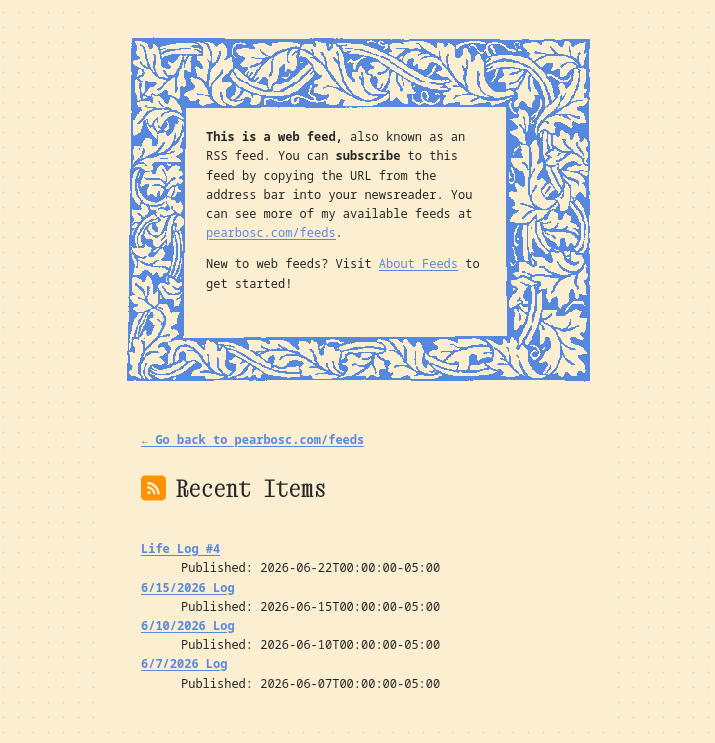
Once this was done, I decided to make a “feeds” page to display the available feeds for my blog and replaced the “subscribe” link with a link to this new page. And that’s it! You can see it and the links to my feeds here.
But this blog post isn’t over yet. I noticed after doing all of this work that Mozilla is planning to remove XSLT support from Firefox (and Google is doing the same for Chrome), so this styling will abruptly stop working in the near future. :( When that happens, I may try out some alternatives. Or just go back to un-styled XML. Who knows. For now though, I really like it!